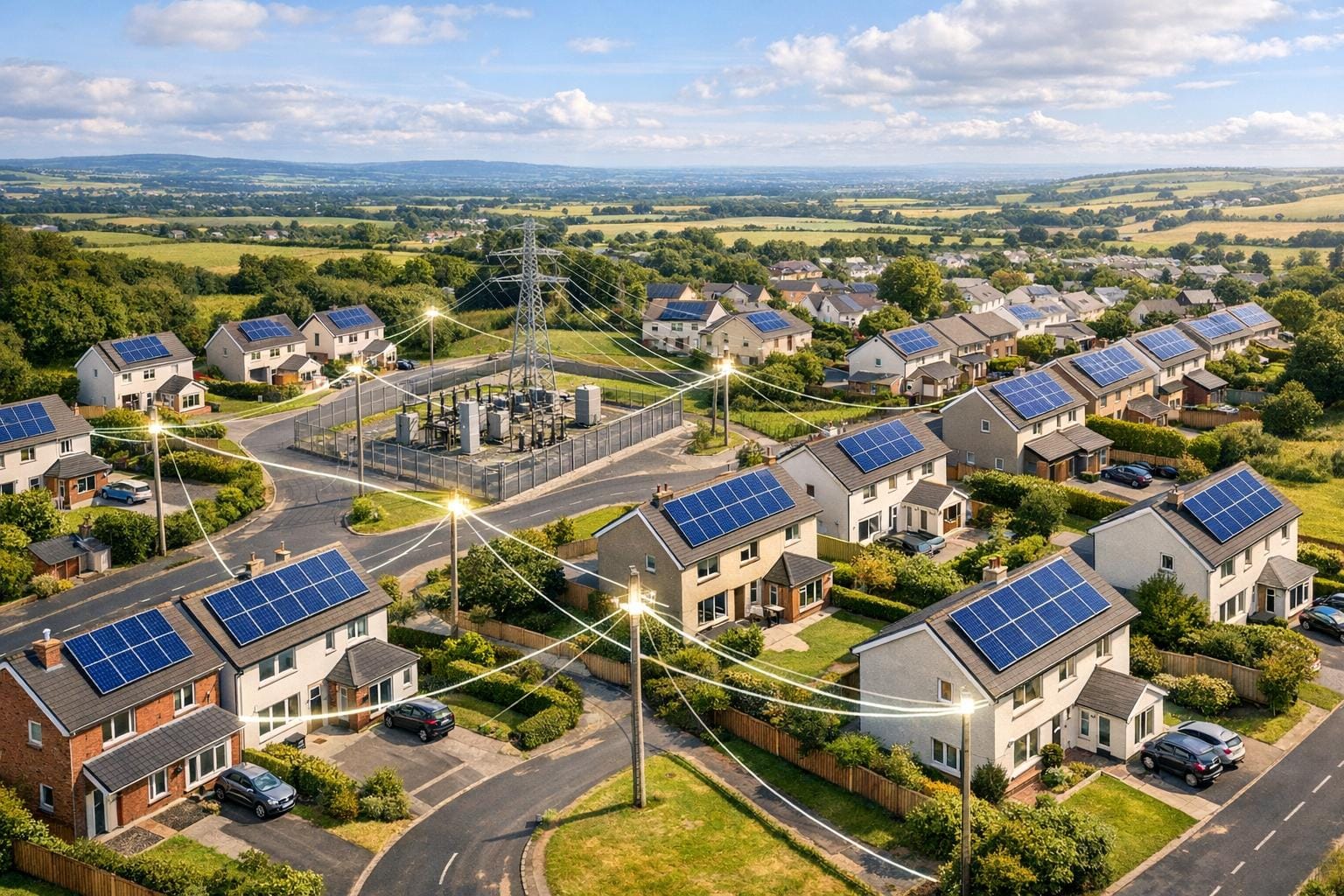
If you’re in Northern Ireland and planning to install solar panels, connecting to NIE Networks is mandatory for legal compliance and to export surplus electricity to the grid. This ensures your system is safe, meets regulations, and won’t disrupt the electricity network. Here’s what you need to know:
- Connection Types: Systems up to 3.68 kW (single-phase) or 11.04 kW (three-phase) fall under the simpler G98/NI process. Larger setups require G99/NI approval.
- Steps to Connect: Check planning requirements, determine your system size, submit an application, accept the connection offer, install your system, and submit post-installation documents.
- Key Rules: Use an NIE-approved inverter, meet deadlines, and ensure all paperwork is complete.
- Costs: G98/NI is free, but G99/NI involves fees based on system size and potential network upgrades.
- Export Meter: NIE installs this to track electricity sent back to the grid, enabling payments for excess energy.
Proper planning, compliance, and working with accredited installers can save time and avoid delays. Keep your system efficient by maintaining panels, considering battery storage, and scheduling energy use during peak solar production hours.
NIE Networks Connection Requirements

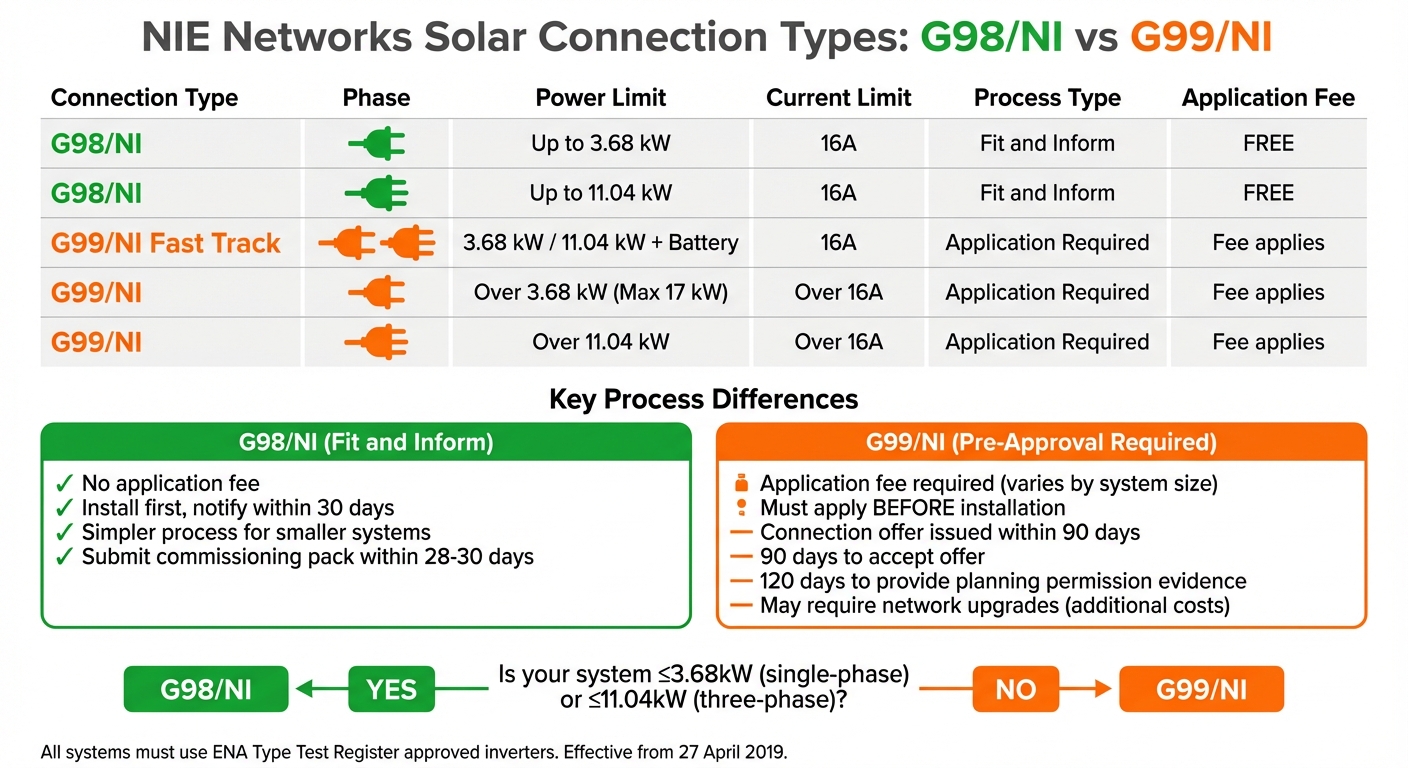
NIE Networks Solar Connection Types: G98/NI vs G99/NI Requirements and Limits
NIE Networks is responsible for managing Northern Ireland’s electricity grid, serving more than 966,000 customers. When you install solar panels, they ensure your inverter complies with the necessary standards and verify that the local network can handle your system’s export capacity.
Here’s a closer look at the rules and technical requirements you’ll need to follow.
What NIE Networks Does
As the distribution network operator, NIE Networks oversees all grid connections. Their role includes maintaining grid stability and managing the export of surplus electricity. Every connection application is reviewed to ensure the equipment meets technical standards and does not cause issues like voltage fluctuations or interference. For larger systems, they may need to evaluate whether upgrades to the network are required before granting approval.
G98/NI and G99/NI Rules Explained
The regulations governing grid connections depend on the size of your system. Since 27 April 2019, all connections must comply with either G98/NI or G99/NI rules.
- G98/NI is a "Fit and Inform" process designed for smaller systems. There is no application fee, and your installer can commission the system first, provided NIE Networks is notified within 30 days.
- G99/NI, on the other hand, applies to larger systems. It requires formal pre-approval, an application fee, and acceptance of the connection offer within 90 days.
Power Limits for Home Solar Systems
The G98/NI process applies to systems up to 16 Amps per phase, which equals 3.68 kW for single-phase supplies (common in most homes) or 11.04 kW for three-phase supplies. If your system exceeds these thresholds, the G99/NI process is required.
For installations that meet the G98/NI limits but include a battery storage system of the same size, a G99/NI Fast Track option is available. However, the maximum you can connect to a single-phase supply is 17 kW. Anything beyond this limit will require upgrading to a three-phase connection.
These power limits determine which connection process you’ll need to follow, ensuring your system integrates smoothly with the grid.
| Connection Type | Phase | Power Limit | Current Limit | Process Type |
|---|---|---|---|---|
| G98/NI | Single-Phase | Up to 3.68 kW | 16A | Fit and Inform |
| G98/NI | Three-Phase | Up to 11.04 kW | 16A | Fit and Inform |
| G99/NI Fast Track | Single/Three-Phase | 3.68 kW / 11.04 kW + Battery | 16A | Application Required |
| G99/NI | Single-Phase | Over 3.68 kW (Max 17 kW) | Over 16A | Application Required |
| G99/NI | Three-Phase | Over 11.04 kW | Over 16A | Application Required |
How to Connect Your Solar PV System
Getting your solar panels connected to the NIE Networks grid involves a straightforward sequence of steps. While the specific process can vary depending on the size of your system, the core steps remain the same. Here’s how to get started.
Step 1: Check Planning and Building Requirements
Most residential solar installations fall under permitted development, so planning permission isn’t typically required. However, it’s important to confirm your roof is structurally sound and that the mounting system is appropriate. For G99/NI systems, planning approval is required, and you’ll need to provide evidence of this within 120 calendar days of receiving your connection offer. Failure to do so could result in your export capacity being withdrawn.
Once you’ve addressed planning and building requirements, you can move on to determining your system size and connection type.
Step 2: Determine Your System Size and Connection Type
The connection type for your solar system depends on the AC output of your inverter. Start by identifying whether your property has a single-phase or three-phase electrical supply. You can check this on your meter board: a single fuse usually indicates a single-phase supply, while three 100A fuses suggest a three-phase setup.
For single-phase systems up to 3.68 kW or three-phase systems up to 11.04 kW, the G98/NI connection type applies. If you’re adding a battery of a similar size, you’ll need to apply under the G99/NI Fast Track process. To determine the correct application form, use the "Help to Decide" tool available on the NIE Networks website.
Step 3: Submit Your NIE Networks Application
For G98/NI systems, you can install your system first and notify NIE Networks within 30 days of commissioning – there’s no application fee for this. However, for G99/NI and Fast Track applications, you must submit your application online via the NIE Networks website before installation begins.
Your application should include the following:
- Your 11-digit Meter Point Reference Number (MPRN), found on your electricity bill
- Your meter serial number
- Site layout maps (scale 1:500 or 1:2,500)
- A single-line diagram of your circuit layout
- Technical datasheets for your solar panels and inverters
- Proof that your inverter is listed on the ENA Type Test Register for Northern Ireland
For applications requiring approval, you’ll also need to pay a fee (including VAT) based on your system size. Once all documents and fees are submitted, your application enters the generation queue and is marked as "valid".
Step 4: Review and Accept the Connection Offer
After receiving your complete application, NIE Networks will issue a connection offer or quote within 90 days. This offer will outline the terms of your connection, including any costs for network upgrades. You’ll need to accept the offer within 90 days – otherwise, your application will be withdrawn. Once you’re satisfied with the terms, sign and return the acceptance documents along with any additional fees specified.
Step 5: Install and Commission Your Solar System
If you’re installing a G98/NI system, your installer can commission it immediately. They must register the system on the day it’s commissioned and submit the full commissioning pack and testing documentation within 28 to 30 days. For G99/NI systems, installation can only begin once you’ve accepted the connection offer. Your installer will handle the installation, connection, and testing before commissioning the system.
Step 6: Submit Post-Installation Documentation
After your system is commissioned, you’ll need to submit a Connection Agreement to NIE Networks. This includes two hard copies with wet ink signatures – one from you and one from your installer (the same person cannot sign both). Along with this agreement, submit all commissioning certificates and test results.
Once NIE Networks processes your documentation, they’ll arrange to install an import/export electricity meter. This meter will allow you to monitor both the electricity you draw from the grid and the surplus energy you export back.
Timelines, Costs, and Common Problems
How Long the Connection Process Takes
Once your application is accepted, the time it takes to connect your system depends on its size and the type of application. For G98/NI systems, you need to notify NIE Networks within 30 days after commissioning. For G99/NI systems, the process is a bit longer – a connection offer is issued within 90 days, and you then have another 90 days to accept it.
After accepting the connection offer, G99/NI applicants are required to provide evidence of planning permission within 120 calendar days. Failing to do so could result in your export capacity being withdrawn. Overall, this process can stretch over several months. As NIE Networks points out:
These legal steps are often slow – they can significantly delay your connection.
Being aware of these timelines helps you plan ahead and manage the steps more effectively.
Connection Costs and What Affects Them
For G98/NI applications, there’s no fee involved. However, G99/NI applications come with fees (including VAT) that vary depending on factors like your export capacity, where your property is located on the network, and whether network upgrades are needed.
If the local network doesn’t have enough capacity, you might have to pay for upgrades, which can increase your costs significantly. To avoid surprises, it’s a good idea to check the NIE Networks Capacity Map before applying. This can help you identify areas where reinforcement might be expensive.
Payments are typically spread over stages:
- An initial application fee
- A deposit, due within 90 days of accepting the offer
- The remaining balance, payable before construction begins
Common Problems and How to Avoid Them
While navigating timelines and costs, you may encounter some common issues. One frequent problem is submitting an incomplete application. To prevent delays, double-check that all technical documents, site maps, and fees are included.
Legal permissions can also be a hurdle. If your connection requires equipment to be installed on land you don’t own, delays could arise. Starting discussions early with landowners to secure wayleaves or easements can save time later.
Another pitfall is missing the 90-day deadline to accept your connection offer. If this happens, you’ll need to restart the application process, which could lead to higher costs.
Lastly, make sure your site is fully prepared before construction begins. Missing elements like trenching, ducting, or meter boxes can delay the process. Additionally, check that your inverter is listed on the ENA Type Test Register before purchasing to avoid compliance issues with your equipment.
sbb-itb-d2d975a
Getting the Most from Your Connected Solar System
Check Your Metering and Billing
NIE Networks will install an import/export electricity meter to monitor how much energy you send back to the grid. This data is crucial for your supplier to calculate export payments accurately. To ensure you’re getting the most out of your solar system, double-check that your supplier receives correct readings. Accurate metering plays a key role in maximising both the financial returns and energy efficiency of your setup.
Each year, you’ll need to submit a photo of your export meter to your supplier – for example, Power NI. This simple step ensures they have the information needed to process your export payments. These payments are usually issued annually, often in the autumn, and are handled separately from your regular electricity bill. Be aware that export tariffs can change; for instance, rates were approximately 17p per kWh in 2022-23 but dropped to around 14p per kWh in 2023-24 as energy prices levelled out.
If your electricity bills remain high despite having solar panels, it could be due to using most of your energy during times when solar production is low. This forces you to rely on grid electricity at standard rates. To counter this, try running energy-intensive appliances like washing machines or dishwashers during the day, when your solar panels are generating power. This simple habit can help you make better use of "free" solar energy and lower your reliance on the grid.
For even greater efficiency, consider exploring battery storage and smart control options, as outlined below.
Add Batteries and Smart Controls
Battery storage allows you to store excess solar energy produced during the day for use during peak evening hours. This can be particularly cost-effective if your supplier offers Time-of-Use tariffs. However, installing a battery system usually requires approval from NIE Networks, especially if it falls under the G99/NI Fast Track or full G99/NI processes.
For single-phase systems, the G99/NI Fast Track limit is 3.68kW, while three-phase systems can handle up to 11.04kW. Any equipment you install, including inverters and batteries, must be listed on the ENA Type Test Register to ensure it’s approved for use in Northern Ireland. Advanced setups often include smart controllers and mobile apps that help coordinate your solar production, battery storage, and high-energy appliances like EV chargers, reducing your reliance on grid electricity.
If you’re unsure about your future energy needs, consider modular battery systems. These allow you to expand storage capacity over time while staying within the limits of your original NIE Networks agreement. Smart controllers can further optimise your system by automatically scheduling heavy electricity use for periods when your solar panels are generating the most energy or when your battery is fully charged.
Thinking ahead can help you prepare for future upgrades to your system.
Plan for Future System Upgrades
To keep your solar panels running efficiently, regular maintenance is crucial. Check for shading from trees or buildings, as well as dirt buildup, since even minor obstructions can significantly reduce output. Keeping your panels clean and unobstructed ensures you’re getting the maximum energy possible.
If you’re considering expanding your system beyond the original G98/NI limits (3.68kW for single-phase or 11.04kW for three-phase), you’ll need to apply for a G99/NI connection. This involves a more detailed technical review. Before making plans for a larger system, consult the NIE Networks "heat map" to see if your area is affected by network saturation, which could limit your ability to export additional power.
Adding extras like EV chargers, heat pumps, or additional battery storage also requires notifying NIE Networks to ensure your connection stays compliant. Any upgrades should remain within your approved connection limits. You might also consider modest DC oversizing to improve performance during low-light conditions. To qualify for financial incentives like the Smart Export Guarantee, make sure all upgrades are installed by MCS-accredited professionals.
Conclusion
Connecting your solar PV system to NIE Networks can be a smooth process if you follow the right steps. First, determine whether your system falls under G98/NI (up to 3.68 kW for single-phase or 11.04 kW for three-phase) or if it requires the G99/NI process for larger setups. Then, check that your inverter is listed on the ENA Type Test Register and submit the appropriate application.
Adhering to NIE Networks’ regulations is essential. This includes using an inverter approved by the ENA Type Test Register, submitting the correct paperwork, and meeting all deadlines. As NIE Networks emphasise:
"You cannot energise your system until your Connection Agreement has been countersigned by NIE Networks."
Missing deadlines or failing to meet technical requirements could result in losing your export capacity and facing delays. By following these steps, you not only avoid unnecessary complications and costs but also ensure your system operates safely and legally, protecting both your investment and the network.
For added peace of mind, working with experienced MCS-accredited installers like EECO Energy can make a big difference. They handle the technical documentation, ensure compliance with IEE Regulations (BS 7671), and verify that your system meets NIE Networks’ specific earthing and protection standards. This helps streamline the process, ensuring your connection is safe, legal, and hassle-free.
FAQs
What is the difference between the G98/NI and G99/NI connection processes for solar installations?
The G98/NI and G99/NI processes are designed to handle solar energy connections, with the appropriate route depending on the system’s size and complexity.
G98/NI is tailored for smaller microgeneration systems. This applies to setups up to 3.68 kW on a single-phase supply or 11.04 kW on a three-phase supply. The process is straightforward – there’s no need for prior approval from NIE Networks. Instead, your installer notifies NIE Networks within 28 days after commissioning the system. This makes it a quicker and more cost-effective option, as it avoids the need for detailed network studies or upgrades.
G99/NI, however, is meant for larger or more complex systems. It requires submitting a formal application to NIE Networks, who will evaluate the connection and provide an offer, typically within about 90 days. This offer will detail any required network upgrades, capacity limitations, and related costs. Although this process takes more time and can be more expensive, it ensures that larger systems are safely and efficiently connected to the grid.
How can I check if my home has a single-phase or three-phase electricity supply?
To figure out your electricity supply type, start by checking the equipment where the utility supply enters your home. Focus on the main panel:
- Single-phase: This setup usually has one main fuse, often rated at 100 A.
- Three-phase: Here, you’ll see three main fuses grouped together, each typically rated at 100 A.
If you’re still uncertain, your electricity supplier can confirm the details using your account information. It’s worth knowing this because single-phase systems can handle up to 17 kW of solar generation, but larger systems will need a three-phase connection.
What can I do if my NIE Networks connection application is delayed or rejected?
If your connection application faces delays or is rejected, your first step should be to get in touch with NIE Networks. They’ll usually send a letter detailing the reasons behind the delay or rejection and outlining your next steps. Take the time to thoroughly review their feedback and double-check that all necessary documents and information were submitted accurately. If you find any errors or omissions, correct them and send the updated information without delay.
Make sure to keep a comprehensive record of all interactions with NIE Networks, including emails, phone calls, and letters. Be sure to note down dates (like 28 December 2025) and any reference numbers they provide. This can be incredibly useful if you need to follow up and shows that you’ve been proactive in addressing the issue.
You can also monitor the progress of your application through the NIE Networks online portal or by contacting them directly for clarification. Acting swiftly and staying organised will help you push forward with your solar installation plans as efficiently as possible.